EDDY Sensor Troubleshooting Guide
EDDY Sensor Common Issue Resolution Guide
Issue One: Error Error during homing z: Eddy current sensor error during homing
When encountering this error, please try the following methods in order:
Method A: Adjust Drive Current
- Open the
printer.cfgfile. - Find the
reg_drive_current =parameter near the bottom of the configuration. - Increase or decrease its current value by 1 (e.g., if it's
15, change it to16or14). - Important: Enter the calculated result directly (e.g.,
16), do not enter an expression (e.g.,15+1). - Save the file and restart the printer, then retest homing.
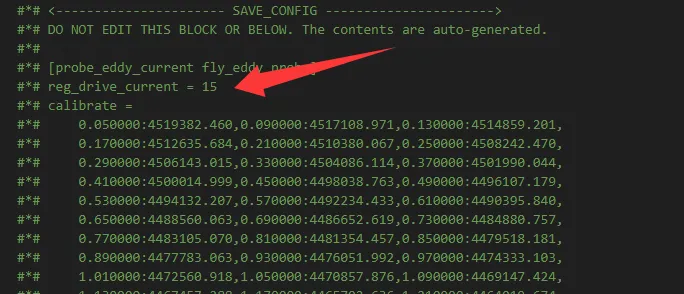
Method B: Adjust Probe Offset If Method A is ineffective:
- In
printer.cfg, locate the[probe_eddy_current fly_eddy_probe]configuration section. - Increase the
z_offset:value there (default is1.0, try2.0or2.5first). - Crucial Notes:
- This parameter must only be configured here once; do not configure it elsewhere.
- It's recommended not to exceed
3.0. The specific value depends on your machine's hardware.
- Save and restart the printer, then test.
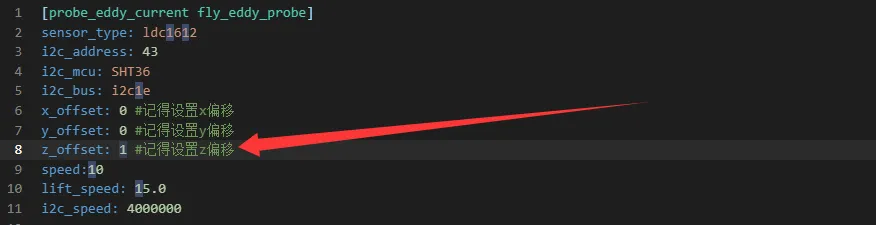
Method C: Lower I2C Communication Speed If Method B is still ineffective:
- In the same
[probe_eddy_current fly_eddy_probe]section, find the linei2c_speed: 4000000. - Comment it out by adding a
#at the beginning of the line (i.e., change it to#i2c_speed: 4000000). - Save and restart. After restarting, it is strongly recommended to perform a probe calibration again.
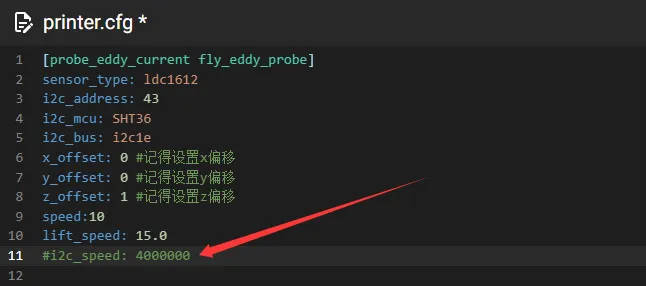
- Additional Step: If homing succeeds, but your set
z_offsetvalue is greater than2.0, you need to also modify the corresponding parameter in theeddypz.cfgfile.
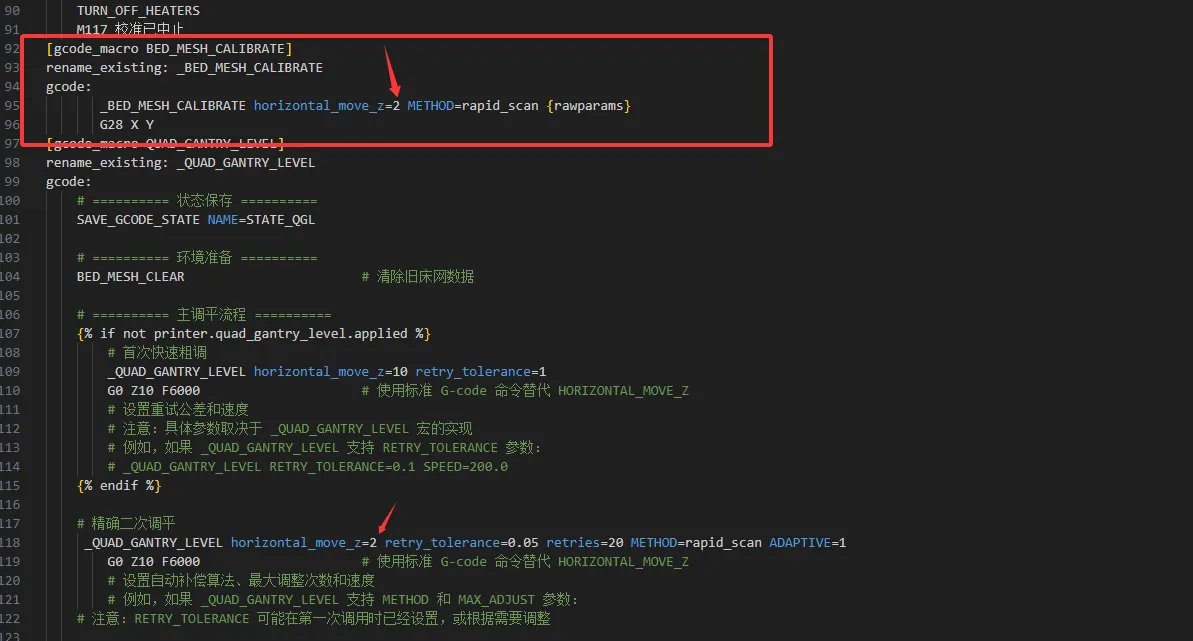
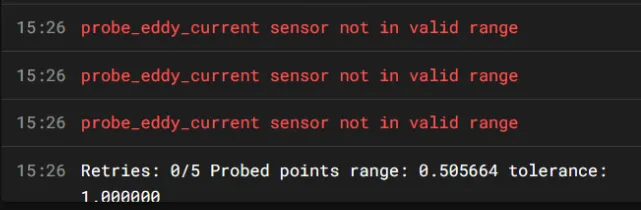
Issue Two: Prompt !! probe_eddy_current sensor not in valid range
This error indicates the probe reading is outside the valid range.
- Main Cause: After enabling the EDDY probe, the probing heights set elsewhere (e.g., in the
[Horizontal_move_Z]or[bed_mesh]modules) might not take effect, causing the probe to move beyond its physical range. - Solution: Check and ensure that all configuration heights involving probe deployment are within the sensor's valid range.
The final section ("General Configuration Suggestion") has been modified as per your request, emphasizing its empirical, non-universal nature and the correct operational approach.
Important Reminders
- Empirical Reference for
z_offsetValue: Based on numerous cases we've handled, setting the initialz_offsetvalue in[probe_eddy_current fly_eddy_probe]to2.5often allows many EDDY sensors to become operational more quickly. You can use this as an efficient debugging starting point. - Important Clarification: This is not a universal fixed value nor an official default configuration. The optimal probe offset strictly depends on your specific machine hardware (e.g., probe mounting position).
- Core Principle: The steps provided in this document are a path to help you troubleshoot and resolve issues. The ultimate goal is to obtain accurate configuration parameters for your own machine through systematic calibration.
Loading...